
Running ZeroPro on a Mac
via Parallels Desktop
ZeroPro is Windows-only — but you can run it on an Apple Silicon Mac. Here's exactly how I do it as part of a daily momentum-scalping workflow: the hardware, the RAM math, and the friction points that actually matter.
Last updated July 15, 2026
ZeroPro is a Windows-only platform, and TradeZero officially confirms it runs on Mac via Parallels Desktop (though they won't troubleshoot emulation issues). With the right hardware and configuration, performance through the 9:35–11:30 AM ET scalping window is reliable. This is the Mac companion to my TradeZero review.
The Core Constraint
Apple Silicon Macs (M1 through M5) run an ARM-based architecture. ZeroPro was built for x86 Windows. Parallels Desktop bridges that gap by running Windows 11 ARM as a virtual machine, which then runs ZeroPro through Windows' built-in x86 emulation layer. That's two layers of translation — and it's why hardware and configuration matter more here than on a native Windows PC.
TradeZero's system requirements state ZeroPro is not natively compatible with macOS — Parallels is the only supported workaround, and TradeZero will direct any Parallels-related problems to Parallels' own support. Keep both support contacts handy.
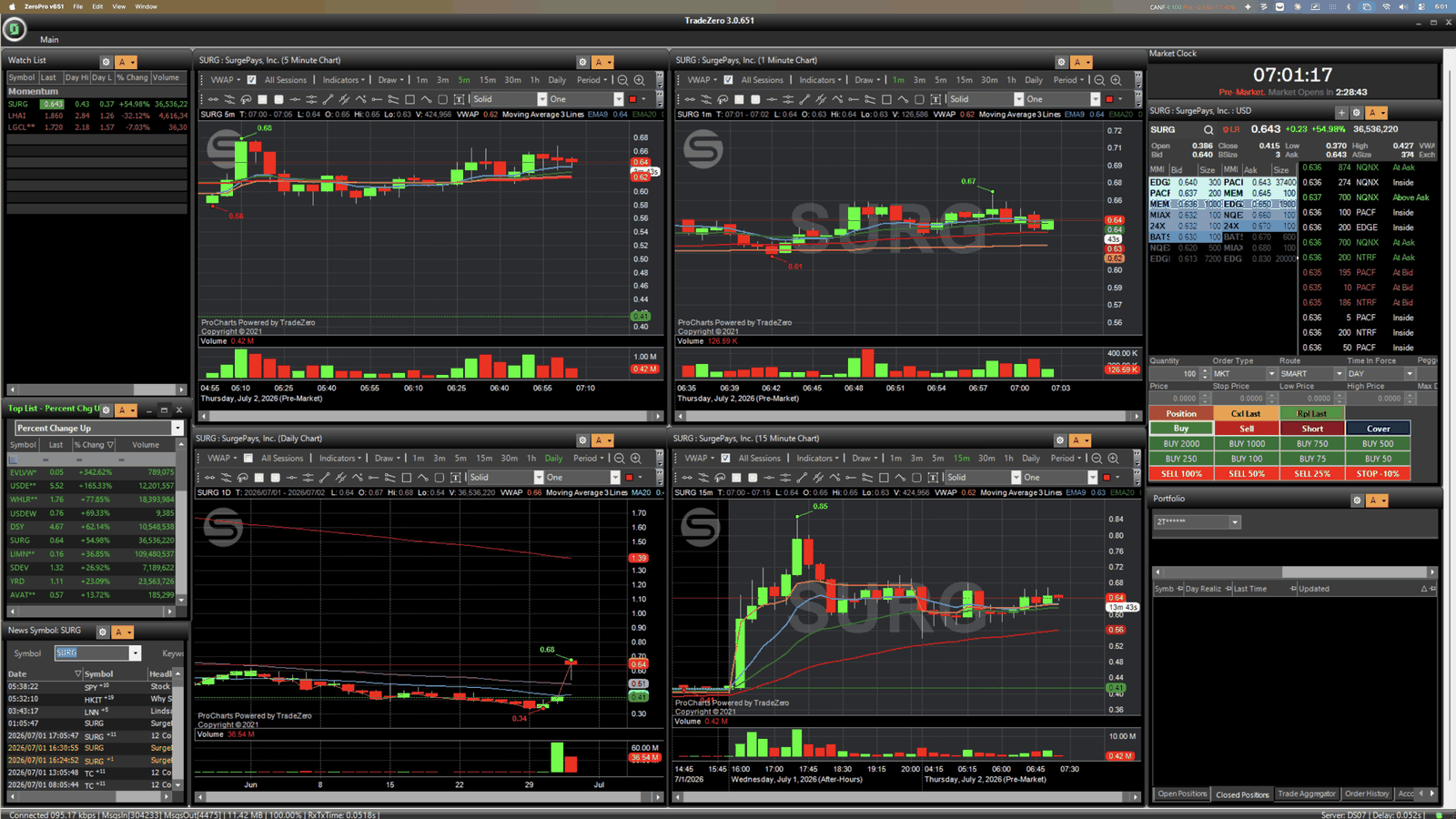
What Works Well
Known Limitations
Recommended Mac Specs
| Spec | Minimum | Recommended |
|---|---|---|
| Chip | M1 Pro / M2 Pro | M4 Max / M5 Max |
| Unified memory | 32GB | 64GB–128GB |
| Storage | 512GB SSD | 1TB–2TB SSD |
| Parallels | Desktop 19+ | Desktop 26 |
| Windows | 11 ARM (Home) | 11 ARM (Pro) |
| Network | WiFi (5GHz) | Wired ethernet |
Why the headroom matters: you want to hand the Windows VM 16–32GB without starving macOS, more CPU cores let the VM and macOS run side by side, and the Windows 11 image alone eats 50–80GB before you add trading apps. If you're speccing a machine from scratch, my full trading workstation breakdown covers the rest of the setup.
Parallels Configuration Tips
- RAM — 16–32GB to the VM. Set it in Parallels → Hardware → Memory, and leave at least equal RAM for the macOS side.
- CPU — 4–8 cores. Allocate roughly half your available cores to the VM for balanced performance.
- Graphics — 2GB+ VRAM. Bump the shared GPU memory if chart rendering feels sluggish.
- Startup — headless / background. Boot the VM 10–15 minutes before the open so first-login overhead doesn't hit you during the 9:35 rush.
Alternatives Worth Knowing
From the Trenches
This guide reflects real, daily use — running ZeroPro inside Parallels on an Apple Silicon Mac as part of a momentum-scalping workflow during the 9:35–11:30 AM ET window. The setup is viable and I rely on it. The biggest friction points are RAM management and making sure the VM is warmed up before the open — not the platform itself. If you're on 32GB or less and trying to run ZeroPro and StocksToTrade at once, you'll feel the ceiling; spec your hardware accordingly, or decide which platform runs native versus in the VM.
Run ZeroPro in Parallels for locates and short execution, and run StocksToTrade natively on macOS (or vice versa). Splitting the load between native and VM cuts the resource competition during volatile opens.
This guide links to Parallels Desktop and TradeZero. Some of those are affiliate links — if you sign up through them, I may earn a referral bonus at no extra cost to you. I only link to tools I've personally used, evaluated, and actually recommend. This is a real field guide from daily use, not a paid placement. See the full Affiliate Disclosure for details.