
Finviz Stock Screener
Elite Review & Premarket Setup
A real-time stock screener and heat map tool that's part of my actual morning routine, before I ever open a charting platform. Here's what it does, what I use it for, and what the trial really costs if you forget to cancel it.
Last updated July 21, 2026
Affiliate link — I earn a commission if you subscribe, at no cost to you. Card required to start the trial.
Or read my full review first ↓
What is Finviz?
Finviz (Financial Visualizations) is a web-based stock research and screening platform. Its core tool is a screener that filters the entire US stock market by dozens of technical and fundamental criteria — float, relative volume, gap %, price range, chart patterns, sector — down to a precise watchlist in seconds. The platform also includes heat maps, insider trading data, news feeds, and basic charting. The free tier requires no signup and is genuinely useful; the Elite plan unlocks real-time data, premarket and after-hours quotes, alerts, API access, and CSV export. This page covers Elite specifically — if you're on the fence, skip to the pricing table below before deciding.
I run a Finviz scan most mornings as the first step in building my own watchlist — well before I ever touch a chart. It's fast, it's filter-rich, and for narrowing thousands of tickers down to a short, relevant list, I haven't found anything quicker. This page covers the Elite plan specifically, since the free tier's delayed data isn't useful for anything happening in real time before the open.
Is Finviz Elite Worth It?
For how I trade, yes — and it comes down to one feature: real-time premarket data. Finviz is the first step of my morning, before I open anything else — I use it to build my premarket briefing and watchlist. During those pre-open hours the free tier's 15–20 minute delay makes it useless: relative volume, gap %, and current volume are the entire point, and numbers that are 15 minutes stale on a stock gapping 40% before the bell aren't data, they're history. Elite makes those filters live. That one thing is what I'm paying $39.50/mo for.
Where it's not worth it: if you screen end-of-day, swing trade off daily bars, or you're still learning the screener, the free tier is genuinely good enough and I'd tell you to stay on it. Elite doesn't add filters or make you a better trader — it removes the delay and adds export and alerts. Pay for it when the delay actually starts costing you setups, not before.
Finviz's 7-day free trial of Elite requires a credit card upfront. You won't be charged during the trial, and you can cancel anytime before it ends — but if you forget, it automatically converts to a paid subscription at $39.50/mo (or $24.96/mo if you selected annual billing) using the card you provided at signup. A 30-day refund is available if you do get charged and want your money back. Worth setting a calendar reminder for day 6.
Finviz as a Premarket Scanner
Finviz Elite's premarket data runs from 4:00 AM ET — earlier than most retail traders need, but useful on high-catalyst mornings when a name starts running at 5 or 6 AM on news. By the time I sit down at 8:30, every filter I care about — relative volume, gap %, current volume — reflects what's actually happening right now, not what happened fifteen minutes ago.
That's the specific job Finviz does in my premarket routine: fast, filter-based narrowing of the whole market before I ever open a chart. It takes less than two minutes to run the scan, save the list, and know what I'm watching. No other tool I've used matches it for raw speed at that task.
The free tier's data delay makes it unsuitable as a premarket scanner — 15 minutes of staleness on a stock gapping 40% before the bell isn't data, it's history. The premarket use case is Elite-specific.
What Elite Actually Adds
Real-Time Data & Premarket Access
The free tier runs on a 15-minute delay — a dealbreaker for anything happening before the open. Elite gives real-time quotes, with premarket data from 4:00 AM ET and after-hours through 8:00 PM ET. Filters like relative volume and gap % then reflect what's moving right now, not what moved 15 minutes ago. For catalyst plays that gap 30–50% before 9:30, that's the whole game.
Advanced Screener Filters
70+ fundamental and technical filters — float, relative volume, gap %, price action, and dozens more. The value isn't any single one of them; it's that you can layer five together, save the result, and re-run the whole thing in seconds every morning instead of rebuilding the same scan by hand before every open.
Export & API Access
Screener results export to CSV, and Elite includes API access — useful if you're piping results into your own tools rather than just reading them on the page. It's the difference between a screener you look at and one you can build on top of. Most people won't need this. If you do, it's the reason to upgrade.
Pricing — Free vs Elite
| Feature | Free | Elite Monthly | Elite Annual |
|---|---|---|---|
| Price | $0 | $39.50/mo | $24.96/mo (~$299/yr) |
| Screener filters | 60+ | 70+ | 70+ |
| Data | 15-min delayed | Real-time | Real-time |
| Premarket & after-hours | ✘ | ✔ 4:00 AM–8:00 PM ET | ✔ 4:00 AM–8:00 PM ET |
| Real-time alerts | ✘ | ✔ | ✔ |
| CSV export | ✘ | ✔ | ✔ |
| API access | ✘ | ✔ | ✔ |
| Backtesting | ✘ | ✔ Daily timeframes only | ✔ Daily timeframes only |
| Signup required | ✘ No signup needed | ✔ Card required for trial | ✔ Card required for trial |
Pricing verified on Finviz's own site on July 21, 2026. Subscription pricing can change — confirm on Finviz before subscribing.
How I Use It For My Own Research
Every morning before the open, I run a saved Momentum scan with five filters stacked together:
- Small / micro-cap
- Price under $20
- Float under 20 million shares
- Relative volume over 2×
- Current volume over 5 million shares
Sorted by volume, descending. On a typical morning that narrows the entire market down from tens of thousands of tickers to roughly 15-20 names. That's it — there's no secret sixth filter. The screenshots below are the actual results from a real run, not a mockup.
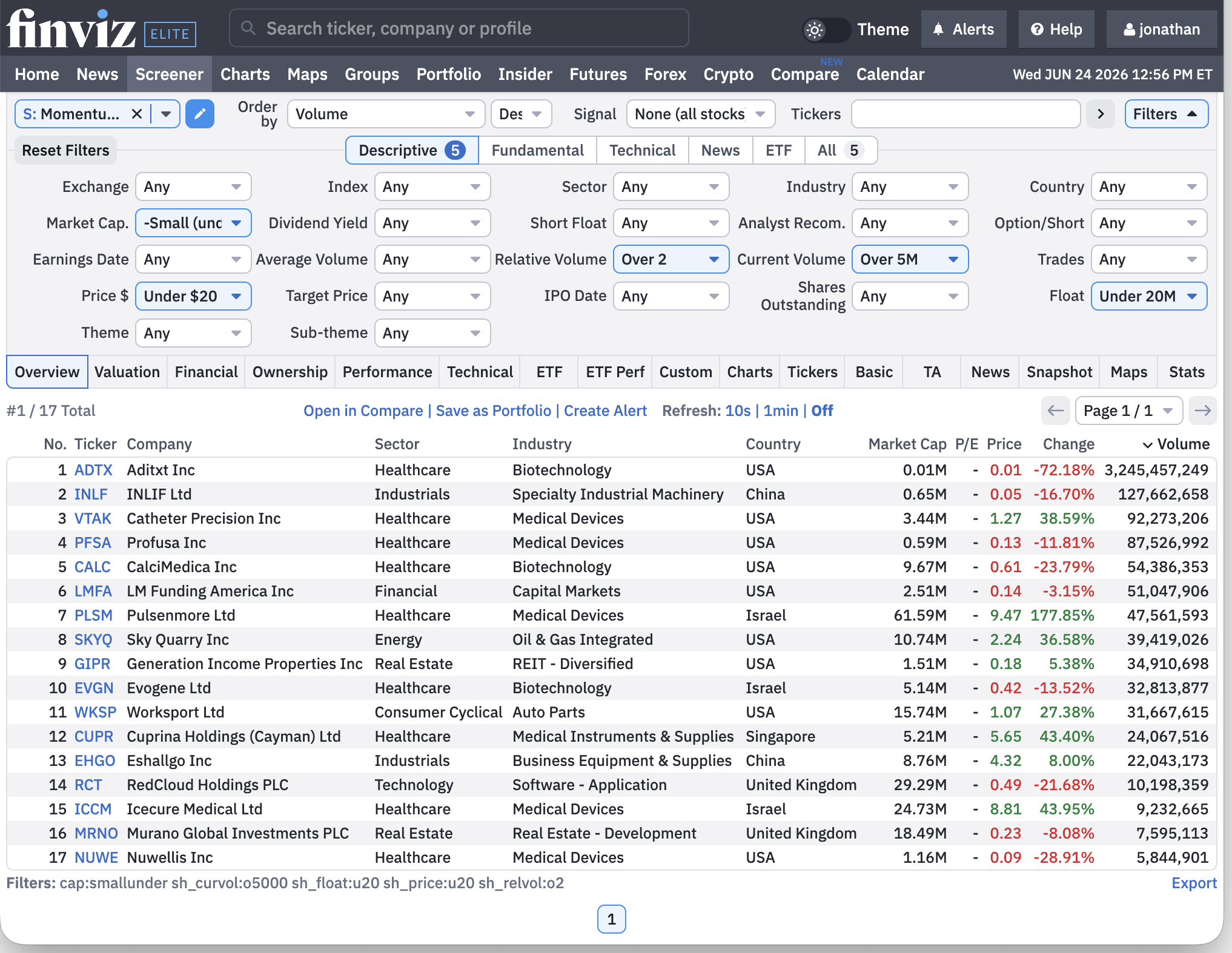
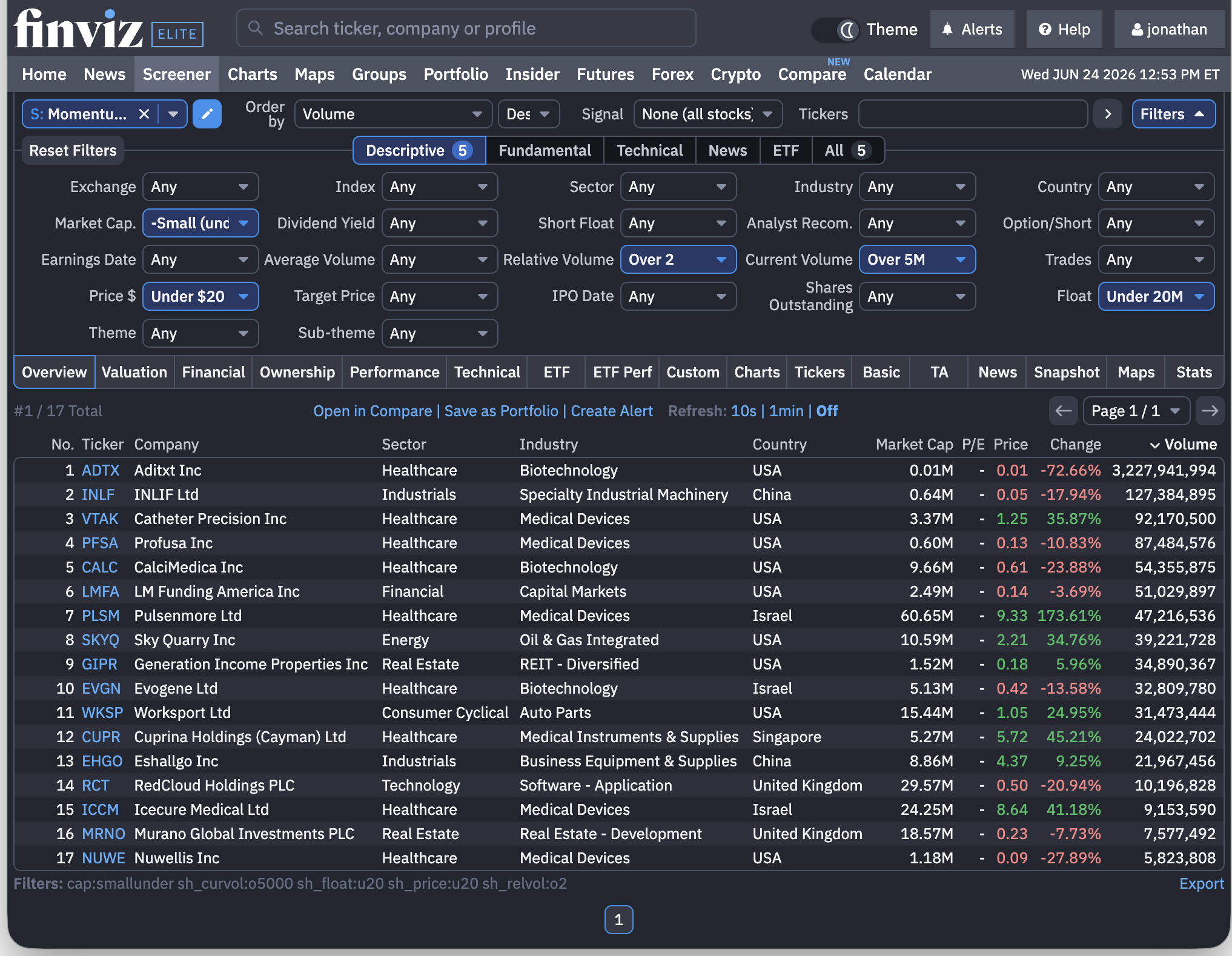
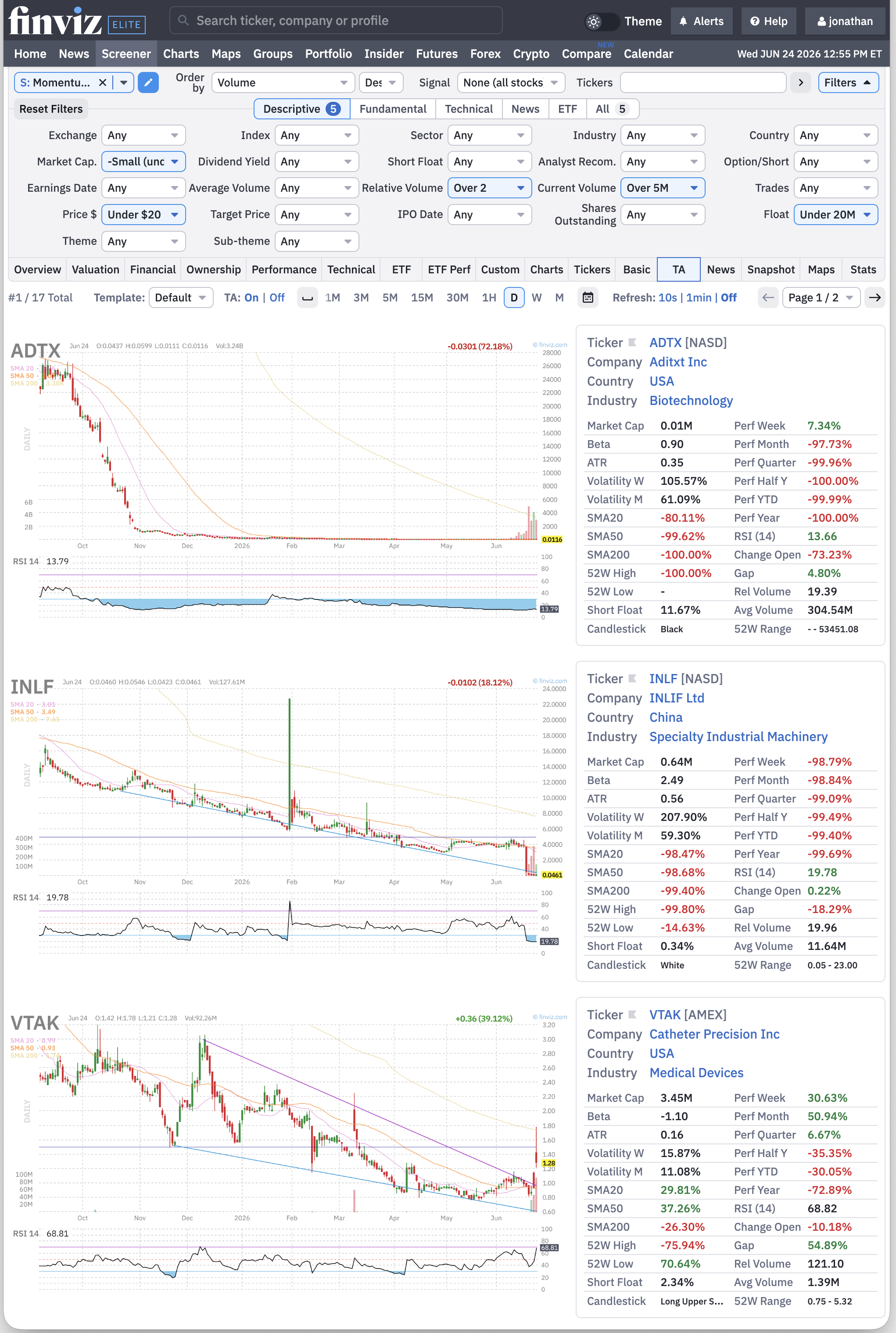
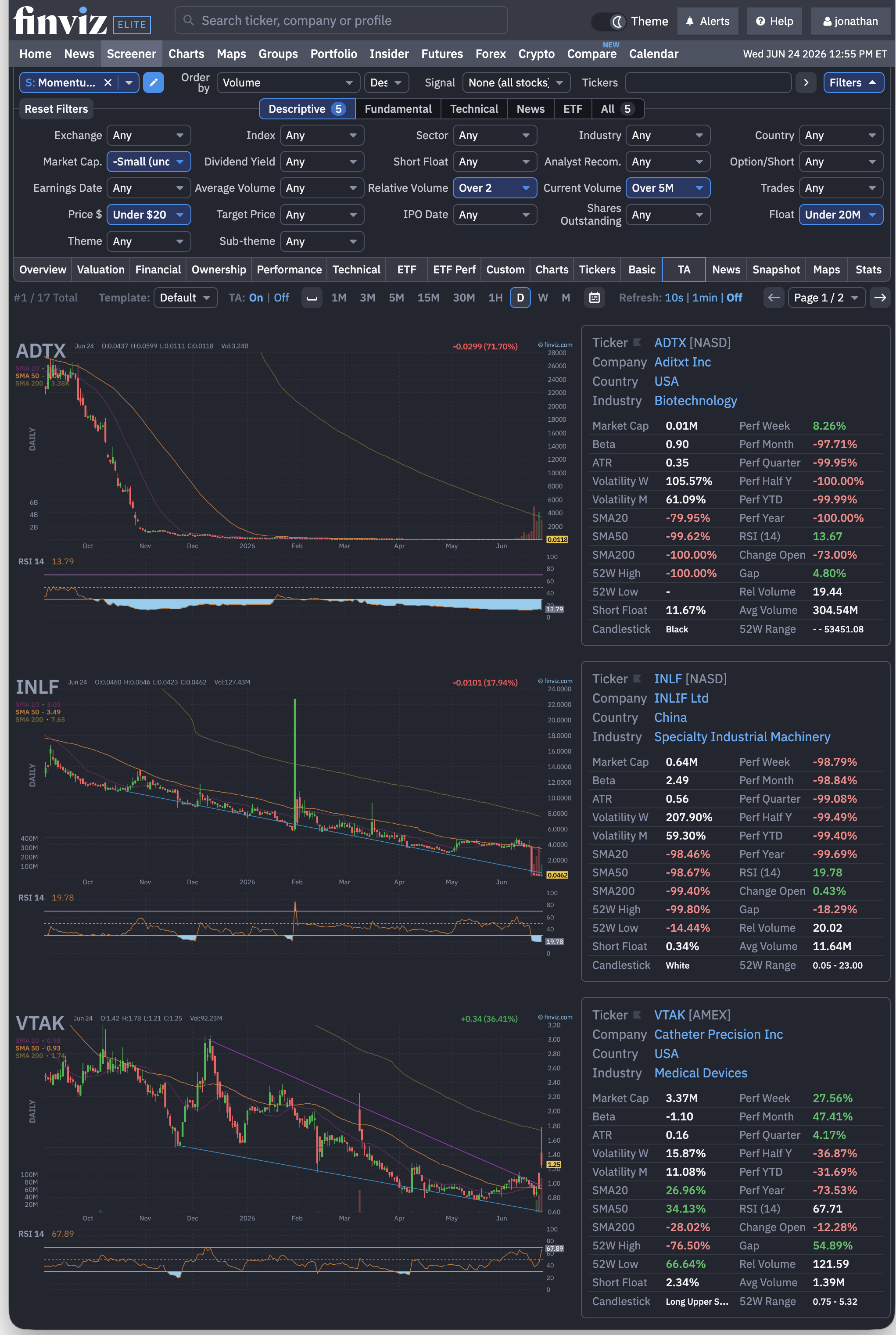
- This filter set narrows the entire market down to roughly 15-20 names that might be attractive to scalp — sorted by volume, not by quality.
- Many of these are genuinely garbage companies, and that's not an oversight — it's exactly the kind of name that moves enough, fast enough, to scalp.
- A trade on one of these can last seconds to a few minutes. You cannot turn your eyes away from one of these during an active trade.
- Only trade this strategy if you already know what you're doing — otherwise, you become someone else's liquidity.
I'm showing this because it's genuinely what my own process looks like, not because I'm suggesting anyone replicate it without real preparation.
I'll be straightforward about the limits, too: Finviz's charting tools are functional but basic compared to a dedicated charting platform, and its backtesting module only works on daily timeframes — fine for simple daily-bar rule testing, not for anything intraday. I use it specifically for the screener and premarket data, then move to a separate platform for actual chart analysis.
What I Built On Top Of It
Fifteen or twenty names is a manageable list, but it's still more than I can watch properly in the twenty minutes before the bell. So I narrowed it further — and because I've spent twenty-five years teaching people to write code, I narrowed it the way a developer would.
I built a small pipeline that runs the same scan through Finviz Elite's data feed, checks each name against the same five filters I'd check by hand, folds in whether there's a real catalyst behind the move, and hands me a short premarket briefing before the open. Tens of thousands of tickers become fifteen or twenty. Fifteen or twenty become five to ten worth actually looking at.
What it does not do is make a single decision. It never places an order, never sends me an alert, and never touches my broker — there is no wire between it and my account, by design. It sorts a list and hands it to me. I still pull up every chart myself, and every trade I take is one I chose, with my own money, looking at the same screen you would be. A shorter list is not a decision. Any tool that offers to make the decision for you is selling you something, and it isn't a tool.
The reason it works at all is the data. A pipeline reading fifteen-minute-old quotes would be worse than useless in the premarket — it would be confidently wrong. But that's not really an argument about automation. It's the same reason the delayed data would fail you if you were sitting there hitting refresh by hand. Fresh data is the requirement. Automating the refresh is just me being lazy about a button.
How Finviz Fits With My Other Tools
Finviz isn't trying to be my whole setup, and I don't treat this as Finviz-versus-everything — it does one job well and hands off to the next tool. I screen on Finviz to build my premarket briefing and watchlist, then move to a dedicated charting platform to actually read the setups it surfaces. Here's where the other tools I use or recommend fit alongside it — not as replacements, but as the rest of the stack.
| Tool | Best for | Cost |
|---|---|---|
| Finviz — this page | Fast premarket screening & watchlist building | Free · Elite $39.50/mo |
| TradingView | Charting, indicators & alerts — where I read the setups Finviz surfaces | Free · paid upgrades |
| StocksToTrade | All-in-one scanning with built-in trading-plan data — pricier, but far more robust and specific | Premium ($$$) |
| Trade Ideas · WallStreetZen | AI-driven scans (Trade Ideas) · beginner-friendly screening & analyst ratings (WallStreetZen) | Paid ($$ · $) |
The short version: Finviz and TradingView sit side by side in my setup every session — one finds the names, the other reads the charts. StocksToTrade is the step up if you want scanning and trade-plan tooling in one place and don't mind paying for it.
Finviz's free tier doesn't actually have a special name — it's just "Free." Unlike TradingView's free tier, which is branded "Basic" (covered on my TradingView page) — easy to mix the two up, and I did too at first. No signup required at all to start using Finviz's free tier. You get 60+ screener filters, heat maps, news, and basic charting — just with a 15-20 minute data delay, ads, and no real-time alerts, backtesting, or CSV export.
I get why the wall of subscription tiers across these tools feels intimidating at first — I felt the same way when I started. The free tier is genuinely good enough to learn the screener, build end-of-day watchlists, and figure out whether this is even something you want to commit money to before the data delay actually becomes a problem for you. There's no shame in starting there.
Common Questions
Is Finviz Elite worth it?
For me, yes — but for one specific reason: real-time premarket data. I run the screener every morning before the open to build a watchlist, and the free tier's 15–20 minute delay makes it useless for anything moving before 9:30 AM. If you only screen end-of-day or swing trade off daily bars, the free tier is genuinely good enough and Elite isn't worth it. If you trade the premarket or need real-time relative volume and gap data, that's exactly what Elite pays for.
What's the difference between Finviz Free and Finviz Elite?
The screener filters are the same on both — 60+ technical and fundamental filters. What changes is data speed and tooling. Free runs on a 15–20 minute delay with ads, no signup required, and no alerts, CSV export, API access, or backtesting. Elite adds real-time quotes, premarket data from 4:00 AM ET, after-hours data to 8:00 PM ET, email alerts, CSV export, API access, and daily-timeframe backtesting, and it removes the ads.
How much does Finviz Elite cost?
Finviz Elite is $39.50 per month, or $299.50 per year — which comes to $24.96 per month on annual billing. There's a 7-day free trial, but it requires a credit card upfront and auto-converts to a paid subscription if you don't cancel before day 7. A 30-day money-back guarantee applies if you get charged and want a refund. Set a reminder for day 6.
Is Finviz good for day trading?
For screening and premarket prep, yes — with Elite. I use it as the first step every morning to narrow the whole market down to 15–20 momentum names using filters like float, relative volume, gap %, and price. But it's a screener, not a charting or execution platform: the charts are basic and backtesting only runs on daily timeframes. I screen on Finviz, then move to a dedicated charting platform for the actual trade.
Does the free version of Finviz have real-time data?
No. The free tier runs on roughly a 15–20 minute quote delay (heat maps refresh a bit faster). That's fine for end-of-day watchlists and learning the screener, but not for anything happening in the premarket or intraday in real time. Real-time quotes and premarket data are Elite-only.
Is the free version of Finviz good enough?
For a lot of traders, yes. The free tier gives you the full screener with 60+ filters, heat maps, news, and basic charting with no signup — the only real wall is the 15–20 minute data delay. If you build end-of-day watchlists, swing trade off daily bars, or you're still learning the screener, free is genuinely enough and I'd tell you to stay on it. The one thing it can't do is show you live premarket movement — that's when Elite starts to earn its price.
What are the best Finviz alternatives?
It depends what you're replacing. For charting rather than screening, TradingView is the natural companion — I use both, not one instead of the other. For an all-in-one scanning platform with built-in trading-plan data, StocksToTrade is the pricier step up. Trade Ideas is worth a look for AI-driven scans, and WallStreetZen is a friendlier, more beginner-oriented screener. That said, for fast premarket screening at this price, I haven't found a reason to replace Finviz — I add tools around it rather than swap it out.
Can you use Finviz for swing trading?
Yes — and the free tier is well suited to it. Swing trading works off daily bars and end-of-day data, so the 15–20 minute delay that rules Finviz out for premarket day trading doesn't matter here. You can screen for setups after the close, build a watchlist for the next few days, and use the fundamental filters to lean the odds your way. For swing trading specifically, I'd start on free and only move to Elite if you want alerts, backtesting, or CSV export.
Card required to start the trial — see the note above before signing up.
The link above is an affiliate link — if you subscribe through it, I earn a commission on the subscription at no extra cost to you. I use Finviz Elite myself, daily, as described above. This isn't a paid placement; it's a tool I'd be recommending whether or not there were a commission attached.
Bullish Tools Trading LLC — Community Tool Resource · Last updated July 21, 2026.
Did you find this helpful? Join the list and I’ll keep you in the loop as I add more tools and guides — no spam, unsubscribe anytime.
I store your email (and name if you add it). Nothing else. Unsubscribe anytime.